
Solution to Visio 2010 crash on Windows 7
1 min read
Don’t know why but the Bluetooth plugin that is installed by default is causing Visio to crash all the time. I disabled the plugin and haven’t had a crash since.
UPDATE: If disabling doesn’t fix the problem then just delete the plugin
1. Go to File –> Options –> Add-Ins
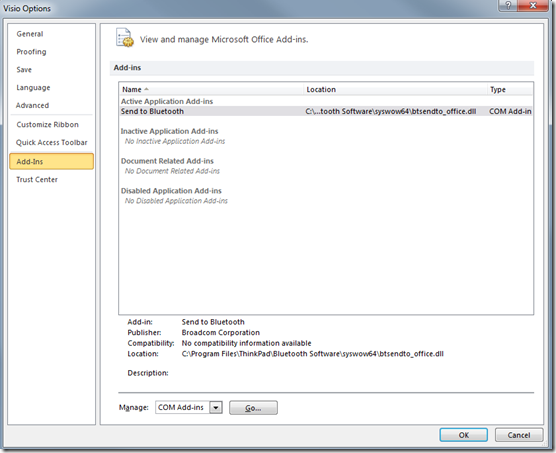
2. Click the Go button

3. Uncheck “Send to Bluetooth”
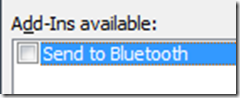
4. Click OK
Share:
Share on LinkedIn
Quick Share: Your custom post text has been copied to your clipboard! Click the button below to open LinkedIn's share dialog, then paste it.
💡 Tip: LinkedIn will open in a new tab. Use Ctrl+V (or Cmd+V on Mac) to paste your text.
Note: LinkedIn will show the article preview. You can add your custom text above it.