

Solution to the exception: Can not load 7-zip library or internal COM error! Message: DLL file does not exist.
1 min read
Here’s how to solve the exception: “Can not load 7-zip library or internal COM error! Message: DLL file does not exist.”

Step 1: SetLibraryPath
Add a call to SetLibraryPath before you init SevenZipExtractor.
SevenZipExtractor.SetLibraryPath(@"C:\Program Files\7-Zip\7z.dll");SevenZipExtractor zip = new SevenZipExtractor(file);zip.ExtractArchive(xsnFolder.FullName);Step 2: Set Platform Target
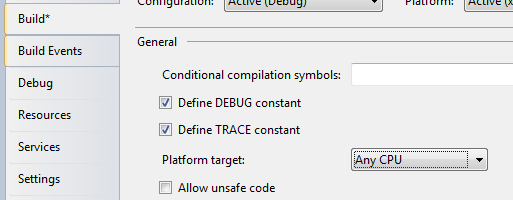
Also make sure that your project Platform target is set to Any CPU.
Jon
Share:
Share on LinkedIn
Quick Share: Your custom post text has been copied to your clipboard! Click the button below to open LinkedIn's share dialog, then paste it.
💡 Tip: LinkedIn will open in a new tab. Use Ctrl+V (or Cmd+V on Mac) to paste your text.
Note: LinkedIn will show the article preview. You can add your custom text above it.