
AngularJS CRUD Grid v2: Now using $resource instead of $http
3 min read
In V1 of my AngularJS, WebApi grid I used $http to call my WebApi endpoints. I’ve been using $resource a lot lately, so I thought I’d go back and update it to use $resource instead.
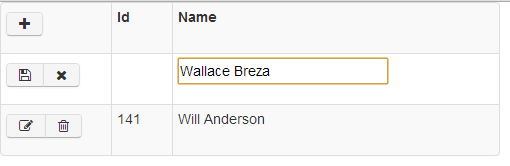
Here’s what it looks like:
Here’s how I wired up resource:
1. Reference angular-resource.js
2. Inject ngResource into the app
var app = angular.module('app', ['ngResource']);
```text
3\. Modify the personFactory to return a resource object instead of the individual $http calls.
```javascript
app.factory('personFactory', function ($http, $resource) {    return $resource('api/person/:id',        { id: '@@id' },        { 'update': { method: 'PUT' } },        { 'query': { method: 'GET', isArray: false } });});
```text
4\. Modify the $scope methods to use the resource methods, save, delete, query, update:
```javascript
$scope.addPerson = function () {    personFactory.save($scope.person, successPostCallback, errorCallback);};
```text
Here’s the entire view. I’ll refactor it later.
```html
<!doctype html><html ng-app="app"><head>    <title>AngularJS-WebApi-EF</title>    @Scripts.Render("~/bundles/jquery")    @Scripts.Render("~/bundles/angular")    @Scripts.Render("~/bundles/toastr")    @Scripts.Render("~/bundles/bootstrap")    @Styles.Render("~/content/bootstrap")    @Styles.Render("~/content/toastr")</head><body>    <div ng-controller="IndexCtrl" ng-cloak>        <table class="crud-grid table table-striped table-bordered table-condensed table-hover">            <tr>                <th style="width: 100px;">                    <div class="btn-toolbar"><i class="btn icon-plus" ng-click="toggleAddMode()"></i></div>                </th>                <th style="width: 50px;">Id</th>                <th>Name</th>            </tr>            <tr ng-show="addMode">                <td>                    <div class="btn-toolbar">                        <div class="btn-group">                            <i class="btn icon-save" ng-click="addPerson()"></i>                            <i class="btn icon-remove" ng-click="toggleAddMode()"></i>                        </div>                    </div>                </td>                <td></td>                <td>                    <input ng-model="person.Name" />                </td>            </tr>            <tr ng-repeat="person in people | orderBy:'Id':true">                <td>                    <div class="btn-toolbar" ng-show="person.editMode == null || person.editMode == false">                        <div class="btn-group">                            <i class="btn icon-edit" ng-click="toggleEditMode(person)"></i>                            <i class="btn icon-trash" ng-click="deletePerson(person)"></i>                        </div>                    </div>                    <div class="btn-toolbar" ng-show="person.editMode == true">                        <div class="btn-group">                            <i class="btn icon-save" ng-click="updatePerson(person)"></i>                            <i class="btn icon-remove" ng-click="toggleEditMode(person)"></i>                        </div>                    </div>                </td>                <td></td>                <td>                    <span ng-show="person.editMode == null || person.editMode == false"></span>                    <input ng-model="person.Name" ng-show="person.editMode == true" />                </td>            </tr>        </table>    </div>    <script type="text/javascript">        var app = angular.module('app', ['ngResource']);
        app.factory('personFactory', function ($http, $resource) {            return $resource('api/person/:id',                { id: '@@id' },                { 'update': { method: 'PUT' } },                { 'query': { method: 'GET', isArray: false } });        });
        app.factory('notificationFactory', function () {            return {                success: function () {                    toastr.success("Success");                },                error: function (text) {                    toastr.error(text, "Error");                }            };        });
        app.controller('IndexCtrl', function ($scope, $q, personFactory, notificationFactory) {            $scope.people = [];            $scope.addMode = false;
            $scope.toggleAddMode = function () {                $scope.addMode = !$scope.addMode;            };
            $scope.toggleEditMode = function (person) {                person.editMode = !person.editMode;            };
            var successCallback = function (e, cb) {                notificationFactory.success();                $scope.getPeople(cb);            };
            var successPostCallback = function (e) {                successCallback(e, function () {                    $scope.toggleAddMode();                    $scope.person = {};                });            };
            var errorCallback = function (e) {                notificationFactory.error(e.data.Message);            };
            $scope.addPerson = function () {                personFactory.save($scope.person, successPostCallback, errorCallback);            };
            $scope.deletePerson = function (person) {                personFactory.delete({ id: person.Id }, successCallback, errorCallback);            };
            $scope.updatePerson = function (person) {                personFactory.update({ id: person.Id }, person, successCallback, errorCallback);            };
            $scope.getPeople = function (cb) {                personFactory.query(function (data) {                    $scope.people = data;                    if (cb) cb();                });            };
            $scope.getPeople();        });    </script></body></html>
Share:
Share on LinkedIn
Quick Share: Your custom post text has been copied to your clipboard! Click the button below to open LinkedIn's share dialog, then paste it.
💡 Tip: LinkedIn will open in a new tab. Use Ctrl+V (or Cmd+V on Mac) to paste your text.
Note: LinkedIn will show the article preview. You can add your custom text above it.