

How to make cross-domain/cross-origin calls with AngularJS, WebApi and CORS
CORS support is very easy to setup in WebApi, but the docs are outdated. They removed the parameterless constructor and didn’t update the docs. For testing purposes, you should just pass “*” for all three parameters. In production you should limit to hosts that you want to be able to call your endpoint.
CODE:
https://github.com/jongio/AngularJS-WebApi-CORS/
Here’s what you need to do:
1. Nuget CORS: Microsoft.AspNet.WebApi.Cors – You need to include prerelease packages when you do a search.
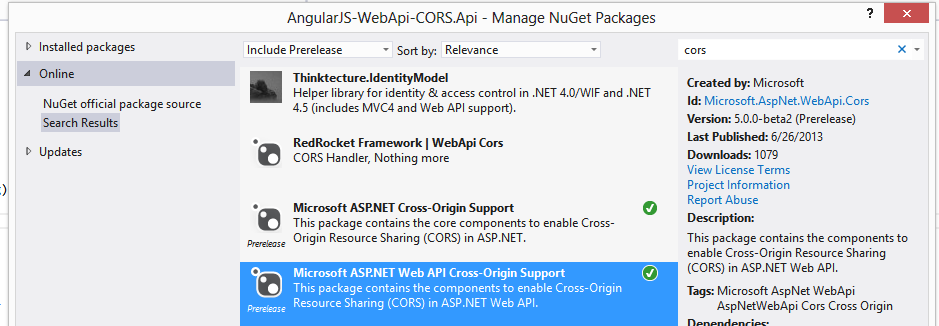
2. Call EnableCors from WebApiConfig
public static class WebApiConfig    {        public static void Register(HttpConfiguration config)        {            config.EnableCors(new EnableCorsAttribute("", "", "*"));
            config.Routes.MapHttpRoute(                name: "DefaultApi",                routeTemplate: "api/{controller}/{id}",                defaults: new { id = RouteParameter.Optional }            );        }    }
```python
3\. Make\*\* $http calls\*\* from AngularJS or any other Spa framework.
```javascript
return $http.post('http://localhost:45211/api/values/add/', value);
```text
Here are the error messages you’ll get when you try to make a cross domain call:
```bash
OPTIONS http://localhost:45211/api/values/add/ 405 (Method Not Allowed) angular.min.js:99
OPTIONS http://localhost:45211/api/values/add/ Origin http://localhost:9087 is not allowed by Access-Control-Allow-Origin. angular.min.js:99
XMLHttpRequest cannot load http://localhost:45211/api/values/add/. Origin http://localhost:9087 is not allowed by Access-Control-Allow-Origin.Share on LinkedIn
Quick Share: Your custom post text has been copied to your clipboard! Click the button below to open LinkedIn's share dialog, then paste it.
💡 Tip: LinkedIn will open in a new tab. Use Ctrl+V (or Cmd+V on Mac) to paste your text.
Note: LinkedIn will show the article preview. You can add your custom text above it.