
How to Integrate a Bootswatch Theme into an ASP.NET Mvc App
1 min read
Bootswatch is nice. Free themes for Bootstrap. Integrating into an MVC app turned out to be a little more involved than I thought it would be.
Here’s what you have to do:
- Sample Code*:
https://github.com/jongio/Bootswatch-Mvc/
1. Install Web Essentials – compiles LESS into CSS http://visualstudiogallery.msdn.microsoft.com/07d54d12-7133-4e15-becb-6f451ea3bea6
2. Install Bootstrap NuGet Package:
PM> Install-Package Twitter.Bootstrap
```text
3\. Install **Bootstrap for MVC** NuGet Package:
```powershell
PM> Install-Package Twitter.Bootstrap.Mvc
```python
4\. Add the Bootstrap **mixins.less** to ~/Content/
[https://raw.github.com/twbs/bootstrap/v2.3.2/less/mixins.less](https://raw.github.com/twbs/bootstrap/v2.3.2/less/mixins.less "https://raw.github.com/twbs/bootstrap/v2.3.2/less/mixins.less")
5\. Add the **variables.less** and **bootswatch.less** from your bootswatch theme to ~/Content/[http://bootswatch.com/2/flatly/](http://bootswatch.com/2/flatly/)
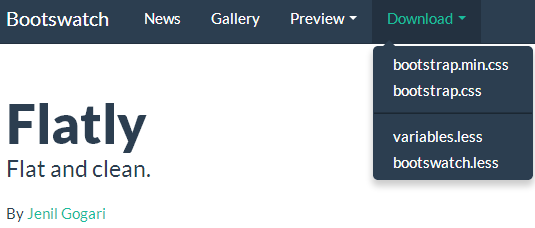
6\. Add the following **imports** to your mixins.less and bootswatch.less files
- *mixins.less**
```javascript
// Mixins// -------------------------------------------------
@import "variables";
```text```javascript
// Flatness by Jenil (www.jgog.in)// Bootswatch 2.3.2// -----------------------------------------------------
@import "mixins";@import "variables";
```text
7\. Save those less files and Web Essentials will compile them to CSS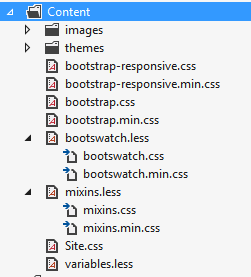
8\. Add **bootswatch.css** to your bootstrap bundle in ~/App\_Start/BootstrapBundleConfig.cs
```csharp
BundleTable.Bundles.Add(new StyleBundle("~/Content/bootstrap").Include("~/Content/bootstrap.css", "~/Content/bootstrap-responsive.css", "~/Content/bootswatch.css"));
```text
9\. Add the **bootstrap bundle** to \_Layout.cshtml
```csharp
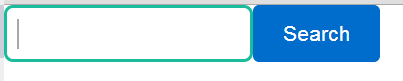
@Styles.Render("~/Content/bootstrap")That’s it. Here’s what my test looks like:
Share:
Share on LinkedIn
Quick Share: Your custom post text has been copied to your clipboard! Click the button below to open LinkedIn's share dialog, then paste it.
💡 Tip: LinkedIn will open in a new tab. Use Ctrl+V (or Cmd+V on Mac) to paste your text.
Note: LinkedIn will show the article preview. You can add your custom text above it.