

Solution to "Port '443' is in use" When Starting a Web App from Visual Studio
1 min read
If you see this error when trying to run a web app in Visual Studio – that means something is currently running on that port.
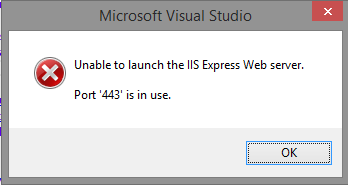
To find out what app is using that port…
Open resmon.exe
Go to Network tab, Listening Ports
Find 443 (or whatever port VS is complaining about)
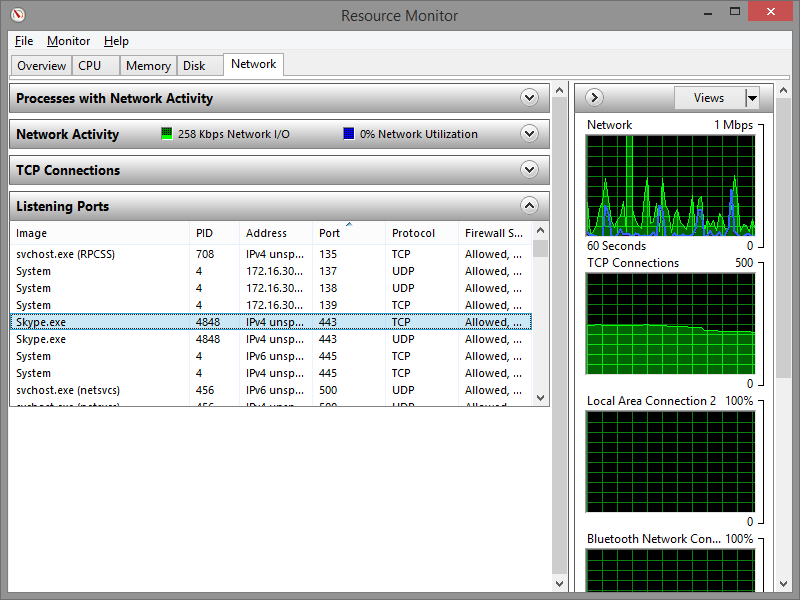
And see what app is using it – and kill it.
In my case Skype was using 443.
Signing out of Skype solved the problem.
Jon
Share:
Share on LinkedIn
Quick Share: Your custom post text has been copied to your clipboard! Click the button below to open LinkedIn's share dialog, then paste it.
💡 Tip: LinkedIn will open in a new tab. Use Ctrl+V (or Cmd+V on Mac) to paste your text.
Note: LinkedIn will show the article preview. You can add your custom text above it.