

Azure IoT Edge on Raspberry Pi
Azure IoT Edge Public Preview was just announced at Microsoft Connect.
Here’s how to get it running on Raspberry Pi with Raspbian Stretch or Stretch Lite. Raspbian Jessie should work as well, but I haven’t tested it yet. Azure IoT Edge does not run on Raspberry Pi with Windows 10 IoT Core, you must use an x64 based board such as the MinnowBoard. Windows 10 IoT Core Instructions can be found here.
Raspberry Pi Setup
1. Setup Raspberry Pi - Follow these instructions to get your Raspberry Pi setup for general Pi dev.
Make sure you change the Pi’s hostname so you don’t have a network naming conflict.
2. Install Python && pip - The Azure IoT Edge Runtime is a Python pip, so Python and pip are required on your edge device.
Raspbian comes with Python 2.7, but run the following to make sure you have it installed.
python --version
```text
It should output `Python 2.7.13`. Python 3 will also work.
Raspbian Full also comes with pip 9.0.1, but run the following to make sure you have it installed. Raspbian Lite does not come with pip, so skip to the install command below to install it.
```python
pip --version
```text
It should output `pip 9.0.1 from /usr/lib/python2.7/dist-packages (python 2.7)`.
If you do not have either of those, then you can install with the following command:
```python
sudo apt install python-pip -y
```text
3\. **Upgrade Setup Tools**You will find the Azure IoT Edge Runtime on PyPI [here](https://pypi.python.org/pypi/azure-iot-edge-runtime-ctl), which has the Raspbian specific steps, which I’ve included here as well. I’ve asked the team to include these steps in the [Linux setup tutorial guide](https://docs.microsoft.com/en-us/azure/iot-edge/tutorial-simulate-device-linux). This issue is being tracked on GitHub [here](https://github.com/Azure/iot-edge/issues/419).
Open a Terminal and run the following:
```bash
sudo pip install --upgrade setuptools pipsudo apt install python2.7-dev libffi-dev libssl-dev -y
```markdown
3\. [**Install Docker**](/raspberrypi-docker) - The Azure IoT Edge Runtime runs as a container and each module is a container, so Docker is required.
## Azure IoT and Azure IoT Edge Setup
Now that you have your Raspberry Pi all setup, you can now follow the instructions on the official Azure IoT Edge docs site: [**Deploy Azure IoT Edge on a simulated device in Linux**](https://docs.microsoft.com/en-us/azure/iot-edge/tutorial-simulate-device-Linux)
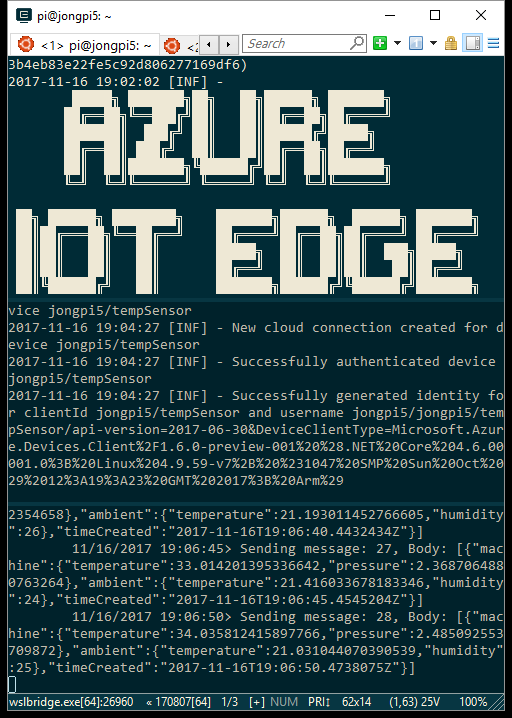
When you’re all set up and running, you can use [ConEmu](https://conemu.github.io/) to see all the logs flowing through in a nice paned layout.
## Troubleshooting
1\. **Upgrade Setup Tools**
If you see any of the following errors, then please run the **Upgrade Setup Tools** step above.
```bash
Failed cleaning build dir for cryptography
```text```bash
Failed building wheel for cffi
```text```bash
c/_cffi_backend.c:15:17: fatal error: ffi.h: No such file or directory #include <ffi.h> ^ compilation terminated. error: command 'arm-linux-gnueabihf-gcc' failed with exit status 1
- ---------------------------------------
Command "/usr/bin/python -u -c "import setuptools, tokenize;__file__='/tmp/pip-build-14Rowp/cffi/setup.py';f=getattr(tokenize, 'open', open)(__file__);code=f.read().replace('\r\n', '\n');f.close();exec(compile(code, __file__, 'exec'))" install --record /tmp/pip-kaIjHU-record/install-record.txt --single-version-externally-managed --compile" failed with error code 1 in /tmp/pip-build-14Rowp/cffi/
```text
2\. **RocksDB Issue**
You will see the following error when you run Azure IoT Edge on Pi. It is a known issue and being tracked on GitHub here: [https://github.com/Azure/iot-edge/issues/417](https://github.com/Azure/iot-edge/issues/417). The result is that you won’t have store-and-forward capabilities (doesn’t persist messages to disk) on Raspberry Pi. The Azure IoT Edge team is working on a fix.
```bash
2017-11-16 19:03:53 [ERR] - Error creating RocksDB store. Falling back to in-memory store.System.TypeInitializationException: The type initializer for 'Microsoft.Azure.Devices.Edge.Storage.RocksDb.ColumnFamilyStorageRocksDbWrapper' threw an exception. ---> System.TypeInitializationException: The type initializer for 'RocksDbSharp.Native' threw an exception. ---> NativeImport.NativeLoadException: Unable to locate rocksdb native library, either install it, or use RocksDbNative nuget packageSearched:/app/native/arm/librocksdb-5.4.6.so: (DllNotFoundException) Unable to load DLL 'libdl': The specified module or one of its dependencies could not be found. (Exception from HRESULT: 0x8007007E) at NativeImport.Importers.Import[T](INativeLibImporter importer, String libName, String version, Boolean suppressUnload) at NativeImport.Auto.Import[T](String name, String version, Boolean suppressUnload) at RocksDbSharp.Native..cctor()
- -- End of inner exception stack trace ---
at RocksDbSharp.OptionsHandle..ctor() at RocksDbSharp.DbOptions..ctor() at Microsoft.Azure.Devices.Edge.Storage.RocksDb.ColumnFamilyStorageRocksDbWrapper..cctor() in /opt/vsts/work/1/s/edge-util/src/Microsoft.Azure.Devices.Edge.Storage.RocksDb/ColumnFamilyStorageRocksDbWrapper.cs:line 24
- -- End of inner exception stack trace ---
at Microsoft.Azure.Devices.Edge.Storage.RocksDb.ColumnFamilyStorageRocksDbWrapper.Create(String path, IEnumerable`1 partitionsList) in /opt/vsts/work/1/s/edge-util/src/Microsoft.Azure.Devices.Edge.Storage.RocksDb/ColumnFamilyStorageRocksDbWrapper.cs:line 48 at Microsoft.Azure.Devices.Edge.Storage.RocksDb.DbStoreProvider.Create(String path, IEnumerable`1 partitionsList) in /opt/vsts/work/1/s/edge-util/src/Microsoft.Azure.Devices.Edge.Storage.RocksDb/DbStoreProvider.cs:line 44 at Microsoft.Azure.Devices.Edge.Hub.Service.Modules.RoutingModule.<Load>b__11_18(IComponentContext c) in /opt/vsts/work/1/s/edge-hub/src/Microsoft.Azure.Devices.Edge.Hub.Service/modules/RoutingModule.cs:line 231
```text
3\. **KeyNotFoundException**
If you see the following error and you aren’t receiving messages, then stop the runtime, rerun setup and restart it. Instructions for doing so can be found here. This issue is being tracked on GitHub here: [https://github.com/Azure/iot-edge/issues/418](https://github.com/Azure/iot-edge/issues/418)
```bash
2017-11-16 19:32:18 [INF] - Updating reported properties for jongpi5/$edgeHub in cloud failed with error System.Collections.Generic.KeyNotFoundException The given key was not present in the dictionary.
```text
4\. **TypeError: unsupported operand type(s) for -=: ‘Retry’ and 'int’**
If you see the following error when installing the runtime, then restart the runtime. I only saw this once and I’m not sure what caused this issue, but I have reported it on GitHub here: [https://github.com/Azure/iot-edge/issues/420](https://github.com/Azure/iot-edge/issues/420)
```bash
sudo pip install -U azure-iot-edge-runtime-ctl
Collecting cffi>=1.7 (from cryptography>=1.3.4; extra == "tls"->docker[tls]==2.6->azure-iot-edge-runtime-ctl)Exception:Traceback (most recent call last): File "/usr/lib/python2.7/dist-packages/pip/basecommand.py", line 215, in main status = self.run(options, args) File "/usr/lib/python2.7/dist-packages/pip/commands/install.py", line 353, in run wb.build(autobuilding=True) File "/usr/lib/python2.7/dist-packages/pip/wheel.py", line 749, in build self.requirement_set.prepare_files(self.finder) File "/usr/lib/python2.7/dist-packages/pip/req/req_set.py", line 380, in prepare_files ignore_dependencies=self.ignore_dependencies)) File "/usr/lib/python2.7/dist-packages/pip/req/req_set.py", line 554, in _prepare_file require_hashes File "/usr/lib/python2.7/dist-packages/pip/req/req_install.py", line 278, in populate_link self.link = finder.find_requirement(self, upgrade) File "/usr/lib/python2.7/dist-packages/pip/index.py", line 465, in find_requirement all_candidates = self.find_all_candidates(req.name) File "/usr/lib/python2.7/dist-packages/pip/index.py", line 423, in find_all_candidates for page in self._get_pages(url_locations, project_name): File "/usr/lib/python2.7/dist-packages/pip/index.py", line 568, in _get_pages page = self._get_page(location) File "/usr/lib/python2.7/dist-packages/pip/index.py", line 683, in _get_page return HTMLPage.get_page(link, session=self.session) File "/usr/lib/python2.7/dist-packages/pip/index.py", line 792, in get_page "Cache-Control": "max-age=600", File "/usr/share/python-wheels/requests-2.12.4-py2.py3-none-any.whl/requests/sessions.py", line 501, in get return self.request('GET', url, **kwargs) File "/usr/lib/python2.7/dist-packages/pip/download.py", line 386, in request return super(PipSession, self).request(method, url, *args, **kwargs) File "/usr/share/python-wheels/requests-2.12.4-py2.py3-none-any.whl/requests/sessions.py", line 488, in request resp = self.send(prep, **send_kwargs) File "/usr/share/python-wheels/requests-2.12.4-py2.py3-none-any.whl/requests/sessions.py", line 609, in send r = adapter.send(request, **kwargs) File "/usr/share/python-wheels/CacheControl-0.11.7-py2.py3-none-any.whl/cachecontrol/adapter.py", line 47, in send resp = super(CacheControlAdapter, self).send(request, **kw) File "/usr/share/python-wheels/requests-2.12.4-py2.py3-none-any.whl/requests/adapters.py", line 423, in send timeout=timeout File "/usr/share/python-wheels/urllib3-1.19.1-py2.py3-none-any.whl/urllib3/connectionpool.py", line 643, in urlopen _stacktrace=sys.exc_info()[2]) File "/usr/share/python-wheels/urllib3-1.19.1-py2.py3-none-any.whl/urllib3/util/retry.py", line 315, in increment total -= 1TypeError: unsupported operand type(s) for -=: 'Retry' and 'int'Share on LinkedIn
Quick Share: Your custom post text has been copied to your clipboard! Click the button below to open LinkedIn's share dialog, then paste it.
💡 Tip: LinkedIn will open in a new tab. Use Ctrl+V (or Cmd+V on Mac) to paste your text.
Note: LinkedIn will show the article preview. You can add your custom text above it.