

Solution to Outlook Hanging (Not Responding) When Opening an Appointment
Outlook has been hanging on me for the last couple of days. Turns out it is related to the Skype Add-in. I disabled the add-in and it’s fine now…but I won’t be able to use Skype integration until that issue is fixed. If you want Outlook back and don’t mind going without Skype for a while then do this:
In Outlook:
1. File -> Options -> Add-ins -> Manage COM Add-ins -> Go

2. Uncheck “Skype Meeting Add-in for Microsoft Outlook 2016”
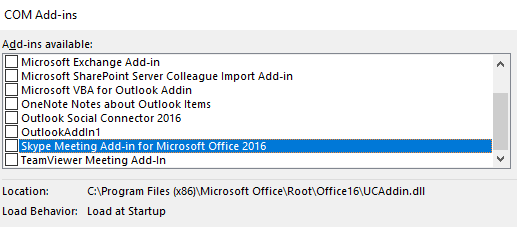
3. Click OK
4. Restart Outlook
You should now be able to open appointments.
Jon
Share on LinkedIn
Quick Share: Your custom post text has been copied to your clipboard! Click the button below to open LinkedIn's share dialog, then paste it.
💡 Tip: LinkedIn will open in a new tab. Use Ctrl+V (or Cmd+V on Mac) to paste your text.
Note: LinkedIn will show the article preview. You can add your custom text above it.