

I Built a Skill to Bootstrap Copilot Canvas Extensions
I’ve been building GitHub Copilot app canvases lately. I recently built my second one and realized I’d already rebuilt the same plumbing twice. If you haven’t run into them yet, a canvas is an interactive surface the Copilot agent can open in a side panel - dashboards, trackers, decision logs, document previews. Both you and the agent act on the same shared state at the same time.
They’re fun to build. But after a handful of them over the past few weeks, I noticed I was solving the same problems over and over. And honestly, I was copy-pasting bits from my last canvas into my next one, which is always a sign I should have done it right the first time.
The Same Plumbing, Every Time
The built-in /create-canvas skill does a great job scaffolding a canvas. It gets you a working surface fast. But the tech underneath, and the way everything wires together, wasn’t as predictable as I wanted. Every canvas I built drifted a little - different state handling here, different styling there, icons done one way in one and another way in the next.
And there’s a set of problems you hit on every single canvas:
- Live shared state. The agent updates the canvas while it works, and you edit on that same surface. Keeping every open panel in sync is real work.
- Keystroke loss. The naive approach repaints the whole panel with
innerHTMLon every state push. That eats your focus and half-typed text. It’s the number one bug in hand-rolled canvases. - Durable storage. State needs to survive a reload, keyed the right way so two panels of the same thing show the same data.
- Theming. It should match the host theme, not look like a random web page bolted onto GitHub.
- Icons. The app ships a specific icon set. Hand-rolling SVGs or pulling a CDN looks off.
I was rebuilding all five of those every time. So one evening I stopped. I spent 2 hours factoring it out, and turned it into a skill.
Create Canvas App
create-canvas-app is a Copilot skill that builds canvas extensions the right way, fast. Add it once:
npx skills add jongio/skillsThen invoke /create-canvas-app from the composer and describe the canvas you want:

The agent loads the skill, stamps a working canvas, shapes it to your request, and checks the UI before handing it back. No build step. The whole thing is a no-build Preact + htm setup with everything vendored.
Here’s what you get baked in:
- Live shared state over SSE. The agent and the user act on the same state through the same action handlers, and every change fans out to all open panels.
- No keystroke loss. Preact diffs the DOM, so a live push from the agent doesn’t clobber your focus or your half-typed input.
- Durable per-user storage under
$COPILOT_HOME/extensions/<name>/artifacts/. - Primer theming with
ck-*classes mapped to the host theme tokens, with GitHub-dark fallbacks. - Official GitHub icons - the exact Lucide set the app ships, vendored and byte-identical.
- A generator and tests so you can stamp a canvas yourself and prove the runtime contract.
The point isn’t just speed. Here’s what I was really after: every canvas I build now starts from the same predictable foundation. The next one works exactly like the last one.
The First Finished Canvas
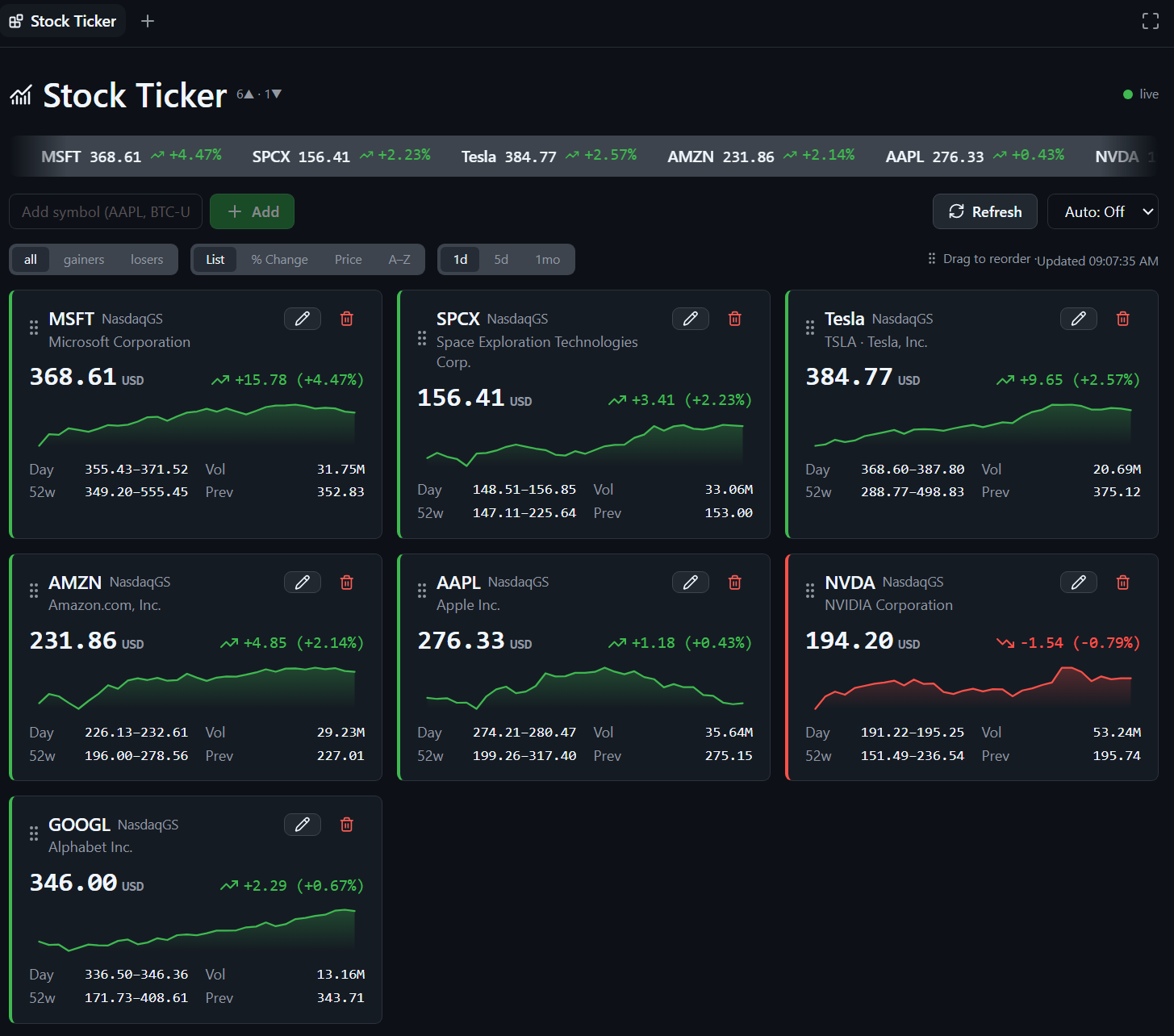
To prove it out, I built a real one: a live stock ticker. It’s the hero image at the top of this post, and here it is again because I like how it turned out.

Live quote cards with sparklines, a scrolling ticker bar, filter and sort tabs, and a watchlist you and the agent both edit. You can add a symbol from the UI, or ask the agent to add one - same handler either way. It’s Primer-themed and uses the official icons, so it looks like it belongs in the app.
I dropped it into a second repo, jongio/copilot-extensions, which is where I’m collecting finished, installable canvases. Installing one is just asking the agent:
install the stock-ticker canvas from jongio/copilot-extensions/extensions/stock-ticker
Copilot fetches the folder, reloads, and it’s ready. Then you say “open stock ticker” and there it is. No clone, no build, no CLI flags.
Installing the Skill
The fastest way to install the skill is the skills CLI:
# Install create-canvas-app globally for GitHub Copilot:npx skills add jongio/skills --skill create-canvas-app -g --agent github-copilotThen reload skills with /skills reload or start a new session, and invoke it by name:
/create-canvas-app build a canvas that tracks release readiness checklist itemsIf you’d rather use the plugin system, the repo also works as a Copilot marketplace. In the app, open Settings and go to Plugins.

Click Install ▾ → Add marketplace, enter jongio/skills, and add it.

The marketplace’s skills show up grouped under jongio-skills. Click Install on create-canvas-app.

It installs and switches on, ready to use right away.

Build One Yourself
You don’t need the agent to drive it. The skill ships a generator that stamps the same working canvas:
# A working list canvas with the skeleton copied in:node scripts/new-canvas.mjs my-board --title "My Board" --dir .github/extensions/my-boardReload extensions, open the canvas, and it works out of the box - add, toggle, and remove items, live, shared between you and the agent. From there you shape four files: canvas.mjs for your logic and action handlers, web/app.mjs for the Preact view, web/index.html for the shell, and extension.mjs for the SDK adapter you’ll rarely touch.
What’s Next
The stock ticker was just the proof. Since then I’ve used the skill to stamp out a bunch more, fast.
A news aggregator that pulls live headlines by topic, with feed, saved, and favorites tabs:

And a language tutor with lessons, XP, streaks, and a frog named Margot who hops between croissants and conjugations:

Each one started from the same predictable foundation, which is the whole point. I’ve got a lot more ideas coming, and I’m collecting the finished ones in jongio/copilot-extensions.
This is the first skill in jongio/skills, and it’s already paying off every time I build. The whole point was to make every canvas as predictable as the first one, and now it is.
If you’re building Copilot app canvases, give the skill a shot. It should bootstrap your whole canvas workflow, and I’d love to hear what you build with it.
Jon
Share on LinkedIn
Quick Share: Your custom post text has been copied to your clipboard! Click the button below to open LinkedIn's share dialog, then paste it.
💡 Tip: LinkedIn will open in a new tab. Use Ctrl+V (or Cmd+V on Mac) to paste your text.
Note: LinkedIn will show the article preview. You can add your custom text above it.