

I Built a Skill to Scaffold GitHub Pages Sites for Any Repo
I’ve shipped a lot of small repos over the past few months - CLIs, skills, experiments. And almost every one of them needs a little site. A landing page, a command reference, a place to send people that isn’t just the README. GitHub Pages is the obvious home for that.
The trouble is, every time I set one up, I’d lose an hour to the same couple of problems, and the result never quite matched the last site I made. I recently spun up yet another repo and reached for Pages again, and I spent 3 hours fighting the exact same two issues I always do. One repo got a hand-rolled HTML page, the next got an Astro site wired up a little differently, and none of them looked like they came from the same person. It’s the kind of setup I should have automated a long time ago. I wanted two things: a consistent look across all of them, and a site that actually says something about the repo instead of shipping a demo page.
The Part Everyone Gets Wrong
The hard part of GitHub Pages isn’t the HTML. It’s the deploy plumbing and the base-path trap.
A project site is served from a subpath: https://you.github.io/your-repo/. So a site built assuming it lives at the root ships with broken CSS, broken images, and broken links the moment it goes up. Assets 404 and the page looks blank. A user site at you.github.io is served from the root, so it must not carry that prefix. Every framework fixes this a different way - base in astro.config.mjs, base plus a basename and a 404.html for React, baseurl for Jekyll - and it’s the single thing I got wrong most often.
Then there’s the deploy side. The current way to ship Pages is the GitHub Actions source, not the old “deploy from a branch” flow. That means the right workflow file, the right permissions, the right first-party actions, and the right artifact upload. It’s not hard once you’ve done it, but it’s fiddly, and it changes - the artifact actions had a breaking v3/v4 cutover in early 2025 that quietly broke a lot of older workflows.
And even once it deploys, you’re staring at “Hello, Astro.” A site that builds but still shows template demo content isn’t done. It’s the part I always meant to come back to and never did.
So I built a skill that owns all three.
Create GitHub Pages Site
create-gh-pages-site is a GitHub Copilot skill that scaffolds a Pages site the right way and wires it to deploy. Add it once:
npx skills add jongio/skillsThen invoke /create-gh-pages-site from the composer and tell it what you want:

Here’s what it does for you:
- Picks the right template for what you’re building -
static-html,astro,react-vite,eleventy, orjekyll. If you don’t say, it asks one question: content site or interactive app? - Injects the correct base path for the target repo, per framework. It reads the repo name off your
originremote and handles the project-site-vs-user-site difference automatically, so the assets actually load. - Ships the official GitHub Actions Pages workflow -
configure-pages, build,upload-pages-artifact,deploy-pages, with the right permissions and thegithub-pagesenvironment. Nogh-pagesbranch to babysit. - Authors the site from your repo. This is the part I care about most. It digests the repo - README, manifests, entry points, docs - and writes a site about your project. A CLI gets a command reference. A library gets a usage page. A collection gets a catalog. It drops in labeled image placeholders you swap your real screenshots into.
That last point is the difference between a site that deploys and a site that’s done. Shipping a page that still says “Hello, world” for someone’s CLI is a failure, even if the workflow is green.
The skill has its own page in the catalog, and that page is the proof - the create-gh-pages-site catalog entry was built by the skill itself. It digested jongio/skills as a collection and rendered a catalog of the skills inside it.
A Gallery to Choose From
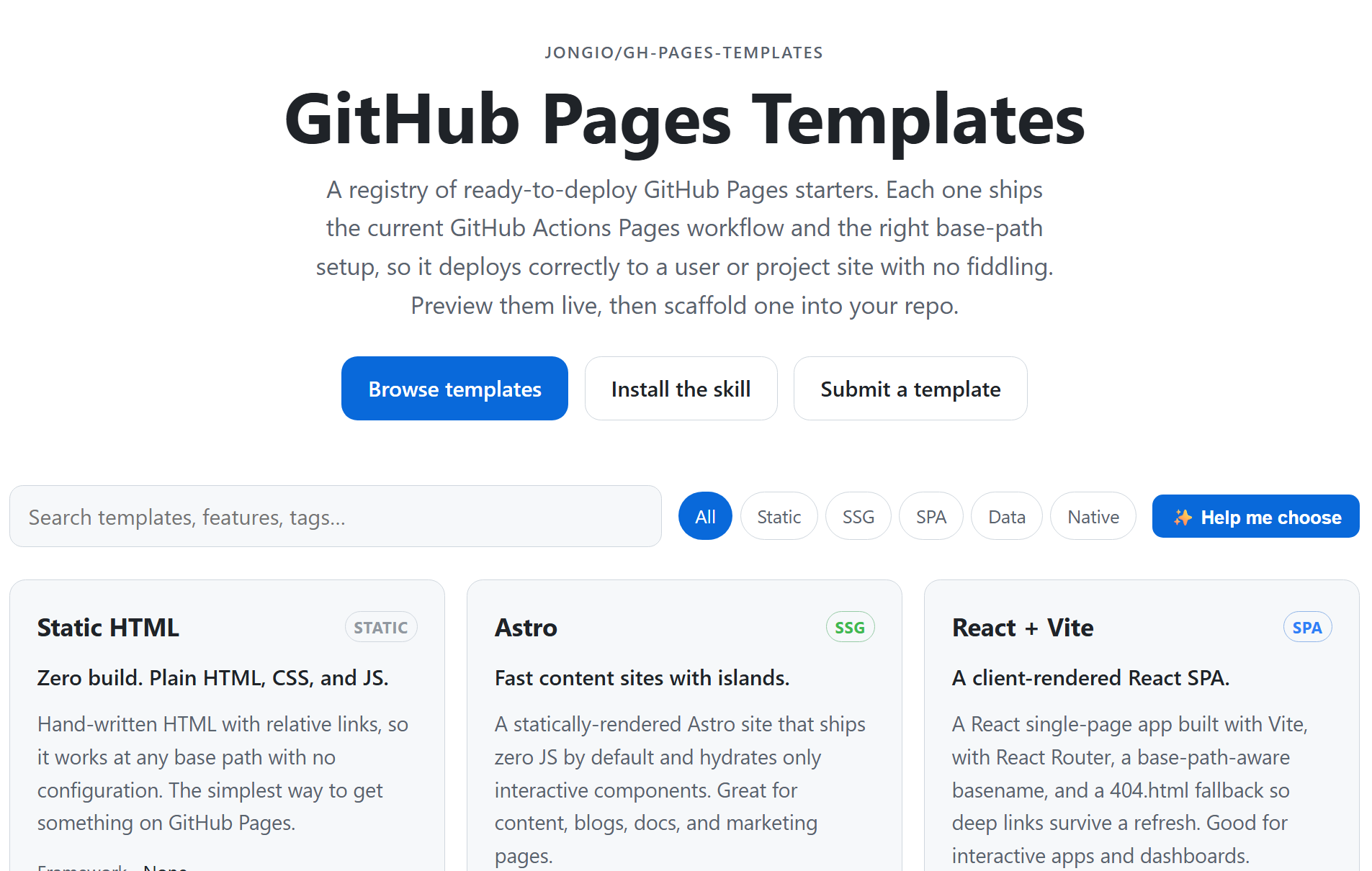
The templates don’t live inside the skill. They live in their own open-source registry, jongio/gh-pages-templates, with a live gallery you can browse and preview before you commit to anything.

There are five starters, and they cover the spread of how people build Pages sites:
- Static HTML - zero build, plain HTML, CSS, and JS with relative links so it works at any base path.
- Astro - a fast, mostly-static content site that ships zero JS by default. Good for blogs, docs, and marketing pages.
- React + Vite - a client-rendered single-page app with routing and a
404.htmlfallback so deep links survive a refresh. - Eleventy - a Markdown- and data-driven site where content is files plus structured data.
- Jekyll - the GitHub-native path, or the one to pick if you’re migrating an existing Jekyll site.
Each card shows the exact prompt to hand Copilot, and there’s a “Help me choose” button if you want the gallery to point you at the right one. Every template ships the current Actions workflow and the correct base-path setup, so it deploys to a project site or a user site with no fiddling.
The nice part is that the gallery and the skill share one source of truth. The generator fetches templates from this registry on each run, so when a template gets fixed or a workflow gets bumped, every new site picks it up. No copies drifting apart.
Installing the Skill
The easiest way is to just ask Copilot. Paste this into the chat and it installs the skill for you:
install create-gh-pages-site from jongio/skillsOr install it yourself with the skills CLI:
# Install create-gh-pages-site globally for GitHub Copilot:npx skills add jongio/skills --skill create-gh-pages-site -g --agent github-copilotThen reload skills with /skills reload or start a new session, and invoke it by name:
/create-gh-pages-site an Astro docs site for my repo octocat/blogLeave out the framework or the repo and the skill interviews you before it scaffolds anything - it never stamps a site on a guess.
If you’d rather use the plugin system, the repo also works as a Copilot marketplace. In the app, open Settings → Plugins → Install ▾ → Add marketplace, enter jongio/skills, and install create-gh-pages-site from there.
Do It Without the Agent
You don’t need Copilot to drive it. The registry ships a generator that stamps the same site:
# Scaffold an Astro site for a specific repo:node scripts/new-site.mjs astro --repo octocat/blog --site-name "Octocat's Blog"It replaces a small set of sentinels - base path, site URL, title, repo slug - across the template, so the result has no placeholders left and deploys as-is. From there you push to main, flip Settings → Pages → Source to GitHub Actions, and the live URL shows up in the Actions run.
Add Your Own Template
I open-sourced the whole thing because five templates is a starting point, not the finish line. A template is just a folder under templates/<name>/ with a template.json manifest, a deploy.yml using the official Pages actions, base-path handling through the generator’s sentinels, and a short README.
Fork jongio/gh-pages-templates, copy an existing template as a starting point, run node scripts/validate.mjs to check it, and open a pull request. CI validates it, and once it’s merged your template shows up in the gallery with a live preview automatically. If you’ve got a Pages setup you like, I’d love to add it to the mix.
What’s Next
This started because I was tired of doing the same hour of setup for every repo and getting a slightly different result each time. Now I run one command and get a site that’s consistent, deploys correctly, and actually talks about the repo it’s for. The point is, the next one works exactly like the last one.
It’s part of jongio/skills, alongside the other skills I’m building. Here’s how you can jump in:
- Install it -
install create-gh-pages-site from jongio/skills, or the skills CLI command above. The catalog page has every install path. - Try it on your next repo and tell me what worked and what didn’t. Feedback and bug reports go on jongio/skills.
- Send a PR - to the skill if you want to sharpen how it scaffolds, or to a template if you spot something to fix.
- Add your own template to the gallery so the next person gets your favorite setup for free.
Five templates and one skill is the starting point, not the finish line. Put a repo on Pages with it, then share what you build.
Jon
Share on LinkedIn
Quick Share: Your custom post text has been copied to your clipboard! Click the button below to open LinkedIn's share dialog, then paste it.
💡 Tip: LinkedIn will open in a new tab. Use Ctrl+V (or Cmd+V on Mac) to paste your text.
Note: LinkedIn will show the article preview. You can add your custom text above it.