

I Built a Copilot CLI Statusline for My Thermometer
I smoke a lot of brisket. Like, a lot. And briskets take 12-16 hours. During those long cooks, I’m usually writing code - but I’m also checking the ThermoWorks app on my phone every 20 minutes to make sure temps are where they should be.
I saw Scott Hanselman’s post about putting his blood sugar in his terminal prompt and thought - I spend all day in GitHub Copilot CLI and all day smoking meat. Why can’t I see my grill temps the same way?
So I looked into it. ThermoWorks has a cloud service, but there’s no public API docs and no Node.js SDK. I found a few Python scripts floating around that reverse-engineered the Firebase backend, but nothing I could just npm install and use. So I built the whole thing from scratch - a TypeScript SDK and a CLI that wires it into the Copilot statusline.

The Idea
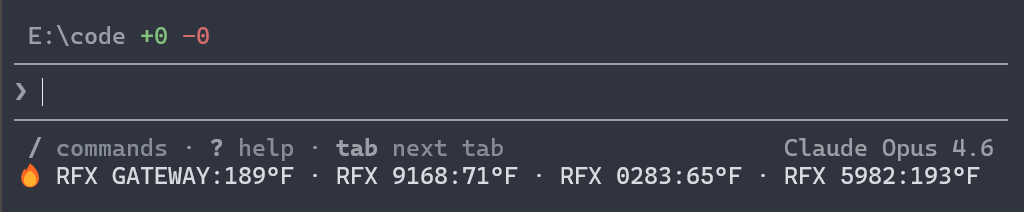
Copilot CLI has this statusline feature at the bottom of the terminal that can display dynamic text. You point it at a command, and it runs that command to get the text to display. I realized I could wire my ThermoWorks Cloud account into that statusline and see live temps without ever leaving my editor.
The result: a fire emoji followed by device names and their current temperatures, updating every time I interact with Copilot.

How It Works
The setup is dead simple:
# Sign in with your ThermoWorks Cloud credentialsnpx thermoworks auth login
# Run the interactive setup wizardnpx thermoworks copilot setup
The wizard walks you through picking which devices and channels you want to display. For multi-channel probes like the Signals, you can show the average across all probes or pick specific channels - maybe you only care about the meat probe and not the pit probe.
Credentials get stored in your OS keychain (macOS Keychain, Windows Credential Vault, or libsecret on Linux). No plaintext passwords sitting in config files.
The Architecture
I spent a couple hours with Copilot CLI reverse-engineering ThermoWorks Cloud’s Firebase backend and building this as a pnpm monorepo with two published packages:
thermoworks-sdk
The SDK is the foundation. It talks to ThermoWorks Cloud (which is backed by Firebase/Firestore) and gives you a clean TypeScript API:
import { ThermoworksCloud } from "thermoworks-sdk";
const client = new ThermoworksCloud({  email: process.env.THERMOWORKS_EMAIL!,  password: process.env.THERMOWORKS_PASSWORD!,});
const devices = await client.getDevices();for (const device of devices) {  const channel = await client.getDeviceChannel(device.serial, 1);  console.log(`${device.label}: ${channel.value}°${channel.units}`);}
client.close();
You can list devices, read individual channels, get averages, filter by type or status - everything you’d need to build your own automations or dashboards.
thermoworks (CLI)
The CLI wraps the SDK and adds the interactive bits - auth management, the Copilot setup wizard, and the copilot status command that Copilot calls to get the statusline text.
Here’s what the device listing looks like:
npx thermoworks devicesIt shows each device with its label, type, status, battery level, and when it was last seen.
Smart Caching
I didn’t want the statusline hammering the ThermoWorks API on every Copilot render. So there’s a caching layer - the CLI caches readings for 30 seconds and serves the cached output until that window expires. The statusline updates whenever Copilot re-renders (on prompts, responses, and state changes), but only fetches fresh data from the API when the cache is stale.
The Stack
- TypeScript end to end
- undici for HTTP (connection pooling, fast)
- @github/keytar for OS keychain access
- tsup for building both ESM and CJS
- vitest for testing
- biome for linting and formatting
- changesets for versioning
Both packages are published to npm with provenance attestation. You can install the CLI globally or just run it with npx.
What’s Next
There’s also a basic landing page in the repo (packages/web) for the project. I’m thinking about adding:
- Temperature alerts (notify me when the brisket hits 203F)
- Session logging (graph a cook over time)
- More integrations beyond Copilot CLI
Try It
If you’ve got ThermoWorks devices and you spend time in the terminal, give it a shot:
npx thermoworks auth loginnpx thermoworks copilot setupThe whole thing is open source on GitHub. MIT licensed. PRs welcome.
And yes - this is an unofficial community project, not affiliated with ThermoWorks the company. Just a customer who wanted to see his grill temps in the terminal.
Share on LinkedIn
Quick Share: Your custom post text has been copied to your clipboard! Click the button below to open LinkedIn's share dialog, then paste it.
💡 Tip: LinkedIn will open in a new tab. Use Ctrl+V (or Cmd+V on Mac) to paste your text.
Note: LinkedIn will show the article preview. You can add your custom text above it.