
Make a Copilot Canvas Multiplayer with a GitHub Repo
A couple of weeks ago I wrote about create-canvas-app, a skill that stamps out Copilot canvases with the same plumbing every time: live shared state, durable storage, theming, icons. That durable storage was per-user, though. Your decisions, your board, your machine. Great for a personal tracker. Not great the moment you want a few people editing the same board.
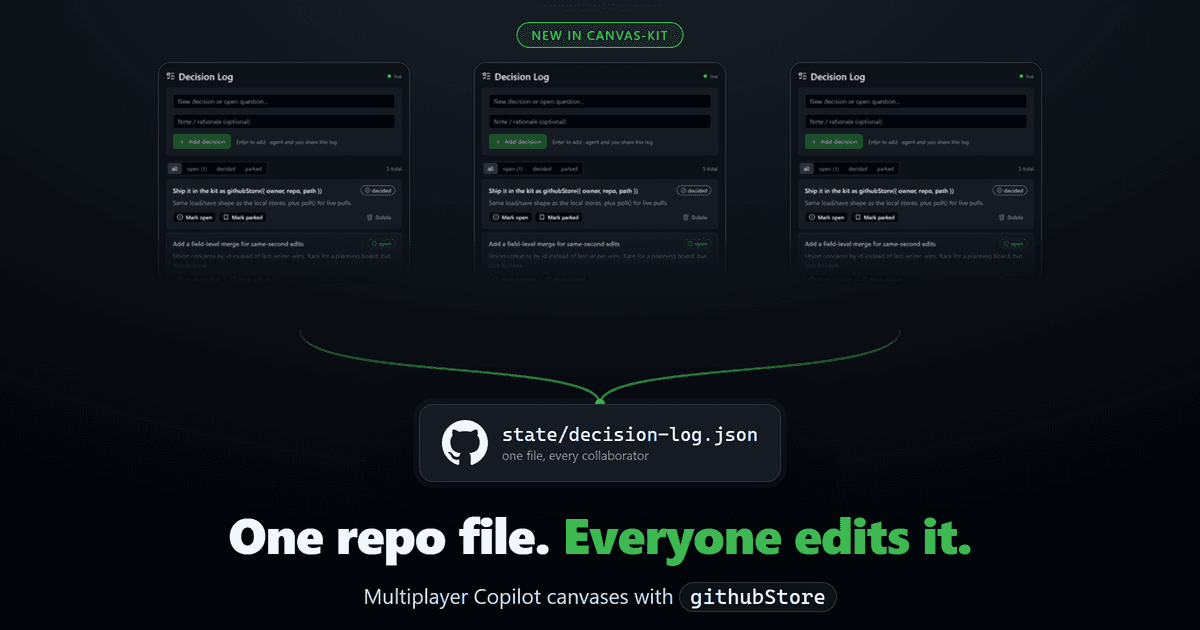
That’s the gap I wanted to close. Here’s the shared board I use as the example, a Decision Log:

The obvious idea, and why it doesn’t work
My first thought was a gist. Dump the state JSON in one, read it back on open. I tried it. The problem is a gist is single-writer, so the second someone else saves, you’re overwriting their work or they’re overwriting yours. You end up doing export and import by hand, which is exactly the thing a shared canvas is supposed to kill.
A repo file is different. A repo already knows how to take writes from a lot of people, keep every version, and control who’s allowed in. So I leaned on that instead.
githubStore
githubStore is a new store in the kit. It backs a canvas with a JSON file in a GitHub repo. One file, many writers. GitHub is the store and the access control at the same time, and there’s no server for you to run.
If you’ve used the kit, you already know the local stores. userStore writes to $COPILOT_HOME/extensions/<name>/artifacts/<domain>.json, private to your machine. githubStore has the same load and save shape, plus a poll for pulling other people’s edits. So making a canvas shared is mostly a swap:
import { githubStore } from "./canvas-kit/github-store.mjs";
const store = githubStore({  owner: "your-org",  repo: "team-decisions",  path: "state/decision-log.json",});
export const canvasConfig = {  // ...the rest of your canvas...  loadState:      (id)    => store.load(null),  saveState:      (id, s) => store.save(s),  syncState:      ()      => store.poll(),   // pull other people's edits  syncIntervalMs: 5000,};
loadState and saveState were already there. syncState and syncIntervalMs are what make it live: the runtime polls the file on an interval and adopts anyone else’s changes into every open panel.
How it works
Every save is a commit. save() PUTs the whole document to the Contents API, base64-encoded, carrying the blob SHA it last read as an optimistic lock. If someone committed ahead of you, the PUT comes back 409, so save() re-reads to refresh the SHA and retries. The default is last-writer-wins for the whole file. If you’d rather resolve conflicts field by field, pass a merge(remote, mine) and, say, union a board’s items by id.
Reads are cheap. Each panel polls with an ETag, so an unchanged poll is a 304 with no body. And it only polls while a panel is actually open. No viewers, no traffic.
The token comes from GH_TOKEN, GITHUB_TOKEN, or gh auth token, and it needs the repo scope for a private repo. It’s only ever sent as an Authorization header. It’s never logged, and never written to the repo.
Every edit is a commit
This is the part I didn’t expect to like so much. Because each save lands as a commit, you get the whole history for free. Who added which decision, who flipped it to decided, when. It’s a file in a repo, so git just shows you the diff:

Two people, one file. I added the optimistic-lock decision from my machine. A few seconds later jmoseley marked another one decided from his, and my panel picked it up and re-rendered. Nobody exported anything. The commits are the sync, and they’re also the audit log.
What to know before you lean on it
I kept this honest about where it fits:
- Last-writer-wins per save. Two people editing the same field inside the same few-second window can clobber each other. That’s rare for a planning board, and you see each other’s edits as you go. Edit different items freely, or wire up a
merge. - It’s polling, not push. Expect a few seconds of latency, not instant.
- It’s a JSON file in a repo. Perfect for human-scale shared state (a board, a log, a checklist). Not a high-write database.
- Use a private repo. The state commits in the clear, and repo access is your access control. Add the people who should see the board, and no one else can.
Getting started
githubStore ships in the create-canvas-app kit. Point it at a repo and path, confirm gh auth status shows the repo scope, and open the canvas. Everyone you’ve added as a collaborator is looking at the same board, live.
I’ve been running a shared planning board this way for a while now, and it’s the first time a Copilot canvas has felt like something a team edits together instead of something I edit alone. Same board, different laptops, and a full git history of how we got there.
Jon
Share on LinkedIn
Quick Share: Your custom post text has been copied to your clipboard! Click the button below to open LinkedIn's share dialog, then paste it.
💡 Tip: LinkedIn will open in a new tab. Use Ctrl+V (or Cmd+V on Mac) to paste your text.
Note: LinkedIn will show the article preview. You can add your custom text above it.