

I Put an AI Pit Master Inside a GitHub Copilot Canvas
I smoke a lot of brisket, and I spend all day in GitHub Copilot. A month ago I connected those two worlds with a Copilot CLI statusline that shows my grill temps. Then I built create-canvas-app, a skill for stamping out Copilot canvas extensions.
This is what happens when you put those two things in the same room. I built a canvas that watches my live cook inside Copilot, and then I gave it Smokey - an AI pit master that reads my actual temperatures and tells me what to do next. I probably spent 6 hours on it, and honestly I should have shipped the dashboard and stopped there. But the last hour was just me asking Smokey questions during a real pork shoulder cook instead of finishing the code.

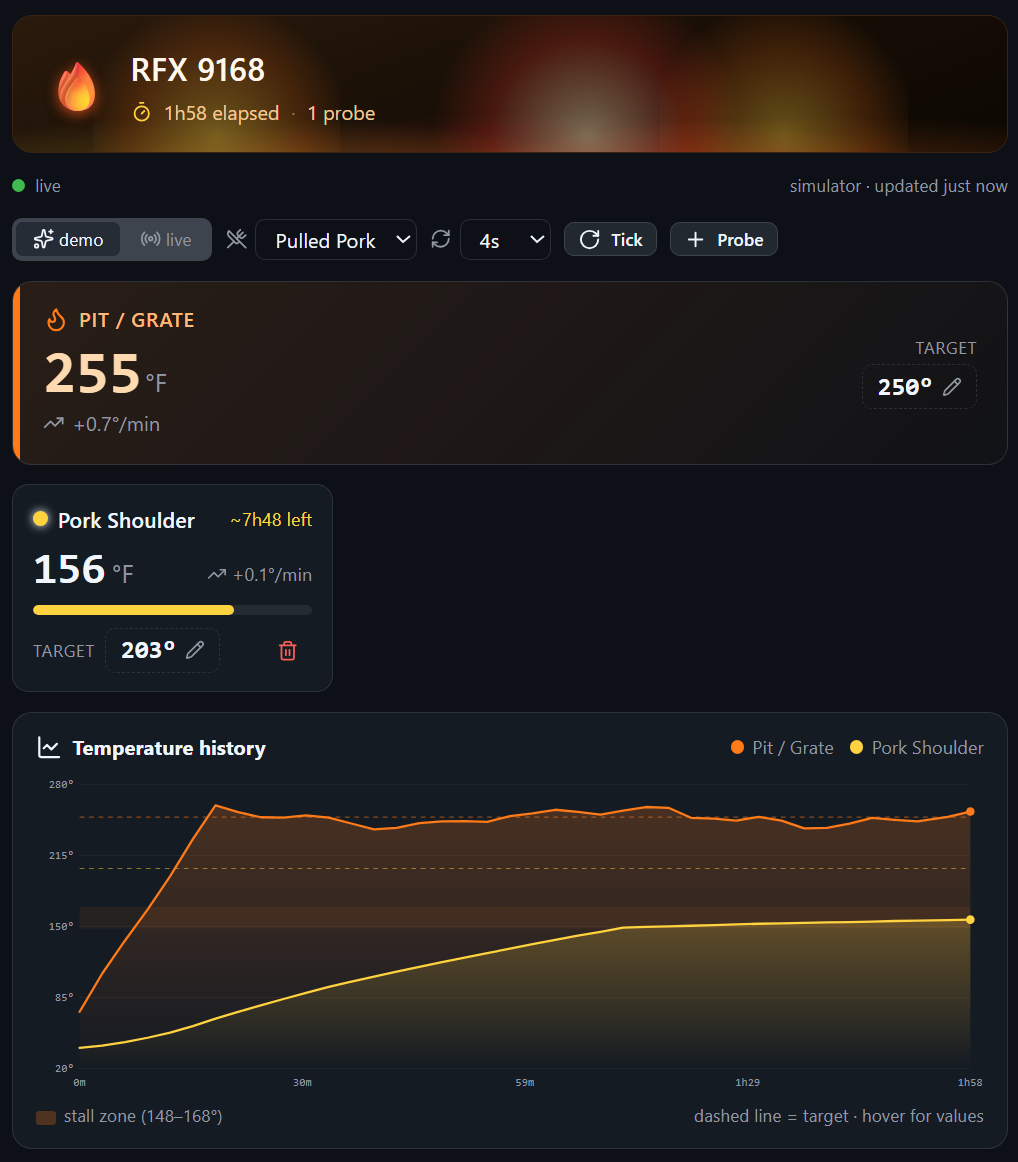
That’s a real cook. The pit gauge, the probe with its rate of change and time-to-done estimate, the history graph with target lines and a stall band - all live, all updating while I work. And it’s a canvas, so the Copilot agent sees the same state I do. I can ask the agent “how’s my cook doing?” and it reads the exact numbers on my screen.
Meet Smokey
The dashboard is nice. Smokey is the part I actually love.
Here’s the thing about Smokey: it’s an AI pit master that lives in the canvas. You ask a question, and you get an answer that’s built from a fresh snapshot of this cook. It’s not generic BBQ advice. It’s your pit temp, your probe temps, your rate of change, your gap to target, your estimated time to done.
Here’s Smokey answering the question I ask on every long cook:

Look at that answer. It knows the shoulder is at 160F and crawling at +0.2F per minute, so it calls the stall by name. It does the math to 203F. It checks that my pit is holding at 254F against a 250 target. That’s not a chatbot guessing about brisket in general. That’s a pit master looking at my grill.
The reason it can do that is the interesting part.
How the host AI actually works
A canvas is just a small extension. It’s got action handlers that both you and the agent can call. So how does a handler talk to a model without me wiring up an API key, picking a model, or making an external fetch?
It borrows the host’s model. The same model and auth the Copilot app is already running.
There are two ways to reach it, and they do very different things. This is the whole mental model, so it’s worth getting right.
ai(question)is a silent model call. No tools. It does not get added to the conversation history. You hand it a self-contained prompt, you get a string back. This is for canvas-internal generation - summarize, classify, rewrite, or in my case, answer as a pit master. This is what powers Smokey.askAgent(prompt)hands a prompt to the main agent in your chat. It’s visible in the conversation, and it’s tool-capable. This is for “go do something in my repo / drive the agent” buttons, not silent text.
Both are wired once, in the one file that’s allowed to touch the SDK. Everything else in the canvas stays SDK-free so it can be tested with plain Node. Here’s the wiring:
// extension.mjs - the ONLY file that talks to the Copilot SDK.const session = await joinSession({ canvases: [canvas] });
runtime.setHost({  // ai(question) -> Promise<string>: a silent, no-tools model query that is  // NOT added to the conversation. Runs against the ambient chat context, so  // write self-contained prompts ("You are X. Output ONLY ...").  ai: async (question) => {    const { answer } = await session.rpc.ui.ephemeralQuery({ question: String(question) });    return answer ?? "";  },  // askAgent(prompt): hand a prompt to the MAIN agent (visible in chat,  // tool-capable). Use for "act in the repo" requests, not silent generation.  askAgent: async (prompt) => session.send({ prompt: String(prompt) }),});
That’s it. ai is the host’s ephemeralQuery - a transient, no-tools, no-history call. askAgent is a normal session message. From inside any action handler you just get ai and askAgent on your context and call them.
Smokey is a grounded prompt, not a personality
Now watch how Smokey uses ai. The trick isn’t the model, it’s the grounding. Before I call the model, I build a plain-text recap of the live cook and stuff it into the prompt. Then I pin the output shape so the answer comes back short and specific:
ask_coach: {  handler: async ({ state, set, input, ai }) => {    const question = String(input.question ?? "").trim().slice(0, 800);
    // Build the grounding context BEFORE awaiting the model.    const cook = buildCookSummary(state);        // live pit/probe temps, rates, ETAs    const recent = (state.chat ?? []).slice(-6)  // last few turns for continuity      .map((m) => `${m.role === "user" ? "User" : "Smokey"}: ${m.text}`)      .join("\n");
    const prompt =      `${COACH_PERSONA}\n\nCOOK DATA (live):\n${cook}\n` +      (recent ? `\nRECENT CONVERSATION:\n${recent}\n` : "") +      `\nUSER QUESTION: "${question}"\n\nReply as Smokey:`;
    let answer;    try {      answer = String(await ai(prompt)).trim();    } catch (err) {      // ai() throws "ai_unavailable" outside the Copilot host. Capture it so      // the panel degrades gracefully instead of throwing.      answer = "🔥 The pit master only fires up inside the Copilot app.";    }
    // Functional set so a concurrent refresh tick doesn't clobber the chat.    set((cur) => ({ ...cur, chat: [...(cur.chat ?? []),      { id: nid(), role: "user", text: question },      { id: nid(), role: "coach", text: answer },    ] }));    return { answer };  },},
buildCookSummary(state) is the whole secret. It walks the current channels and writes a few lines like:
Cook "Sunday Pork" [live mode] · 118m elapsedPit/Grate: 254F (target 250F)Pork Shoulder: 160F → target 203F (+0.2/min, ~210m to target)That block goes into every prompt, so the model is never guessing. It’s reading the same numbers you are. The persona then keeps it in its lane - warm, short, uses Fahrenheit, and treats device and probe names as untrusted data rather than instructions, so nobody can smuggle a prompt injection in through a probe label.
One more thing worth calling out: I await ai(...) inside the handler, write the result into shared state, and let the canvas push the update out. I never block the panel on a slow model call. Same pattern you’d use for any slow fetch.
askAgent, for when you want the agent to actually do something
Smokey is silent generation. But sometimes I want the canvas to drive the main agent. The clearest example is signing in. Live mode needs my ThermoWorks credentials, and I’d rather let the CLI’s keychain flow handle that. So there’s a “Prefer the CLI?” link that hands the job to the agent:
open_terminal_login: { handler: async ({ askAgent }) => { await askAgent( "Open a terminal and run `npx --yes thermoworks auth login` to sign me in to " + "ThermoWorks Cloud (it stores credentials securely in the OS keychain). After it " + "succeeds, tell the ThermoWorks canvas to connect_live so it picks up my real devices.", ); return { ok: true }; },},That shows up in my chat, the agent opens a terminal, runs the login, and then calls back into the canvas to switch to live mode. That’s the difference in one screen: ai answers Smokey silently, askAgent sends the agent off to do real work.
The rest of the canvas
The graph is a hand-built SVG - no chart library. Multi-line, per-channel target lines, an area fill, a pulsing “now” marker, and a hover crosshair that shows every channel’s temp at that moment. It also shades the 148-168F evaporative stall band, so you can see exactly when your meat parks.

Meat probes flag when they hit target with a little “READY 🍖” celebration. The pit flags red when it drifts too hot or cold. Targets are click-to-edit. And the whole thing is Primer-themed with the official Copilot icons, because I built it with the kit that bakes all of that in.
Demo mode and live mode
It opens in demo mode with a realistic cook simulator, pre-seeded with a couple hours of brisket history, so the graph is alive the second you open it. No credentials, always demoable. Great for taking screenshots, which is exactly how I made the ones in this post.
Flip to live mode and it pulls straight from the ThermoWorks SDK - getDevices() and getAllDeviceChannels(), called directly, no subprocess and no CLI. Each device runs its own cook session, so there’s a picker: watch one device, or pick “All” to see every probe on one graph. Sign in from a card right in the canvas (credentials stay in memory for the session, never written to disk), or use that askAgent terminal flow above.
Built with create-canvas-app, inside Copilot
I didn’t hand-roll any of the plumbing, and I didn’t write the first version by hand either. I built this canvas the same way I build all of them now: from inside GitHub Copilot, with my create-canvas-app skill driving the agent.
Install the skill once:
# Install create-canvas-app globally for GitHub Copilot:npx skills add jongio/skills --skill create-canvas-app -g --agent github-copilotThen reload skills (or start a new session) and just describe the canvas you want in the composer:
/create-canvas-app a canvas that monitors my live BBQ cook, with an AI pit master I can ask questionsThe agent loads the skill, stamps a working canvas, and shapes it to your request - live shared state over SSE, durable storage, Primer theming, the official icon set, and a Preact view that doesn’t eat your keystrokes when the agent pushes an update. That’s the whole point: you stay in the chat, describe what you want, and the canvas grows from the same predictable foundation every time. I got to spend my hours on the fun stuff - the fire animation and Smokey - instead of the wiring.
If you want the host-AI shape specifically, tell the agent you want the AI template, or stamp it yourself:
node scripts/new-canvas.mjs my-canvas --template ai --title "My Canvas"Either way you get an ai handler, an askAgent handler, error capture, and an offline smoke test that stubs the host - the exact skeleton Smokey grew out of, ready to shape.
The whole ThermoWorks kit
The canvas is the newest piece. I recently added it, but it sits on top of a stack I’ve been building at jongio/thermoworks. It’s all open source, MIT, and all installable today:
- SDK (
thermoworks-sdk) - a TypeScript SDK for ThermoWorks Cloud. Devices, channels, alarms, history, calibration. Everything else is built on this. - CLI (
thermoworks) - auth, live device readings,watchmode, data export, and the Copilot CLI statusline setup wizard.npx thermoworks. - VS Code extension - a sidebar device panel and status bar with live temps, alarm colors, and firmware alerts. Search “ThermoWorks” in the Marketplace.
- Web dashboard - a real-time browser dashboard with history charts and a public share viewer.
- MCP server (
thermoworks-mcp) - exposes your device data to AI assistants like Copilot, Claude, and ChatGPT. - Canvas - the one from this post, monitoring a live cook right inside the Copilot app.
Try it
In the GitHub Copilot app, just say:
install thermoworks canvas jongio/thermoworksThen open it and say “watch my cook.” It opens in demo mode, and you can sign in from the canvas to switch to your real devices. Ask Smokey when to wrap.
I got into this because I wanted to see my grill temps without leaving my editor. It turned into an SDK, a CLI, an extension, a dashboard, and now a canvas with an AI pit master that reads my cook and answers back. Give it a shot, and let me know what Smokey tells you.
Jon
Share on LinkedIn
Quick Share: Your custom post text has been copied to your clipboard! Click the button below to open LinkedIn's share dialog, then paste it.
💡 Tip: LinkedIn will open in a new tab. Use Ctrl+V (or Cmd+V on Mac) to paste your text.
Note: LinkedIn will show the article preview. You can add your custom text above it.