

Track PRs, Issues, and Agents in Copilot CLI Statuslines
I’m still using GitHub Copilot CLI, and I’m often switching between sessions to check on things. Which PR is this one working on? Which issue? What are the subagents doing?
I wanted to glance down at the statusline, get that context, and open the relevant PR or issue in my browser. Without scrolling back through the conversation.
So I built three composable statuslines.

Pick What You Want to See
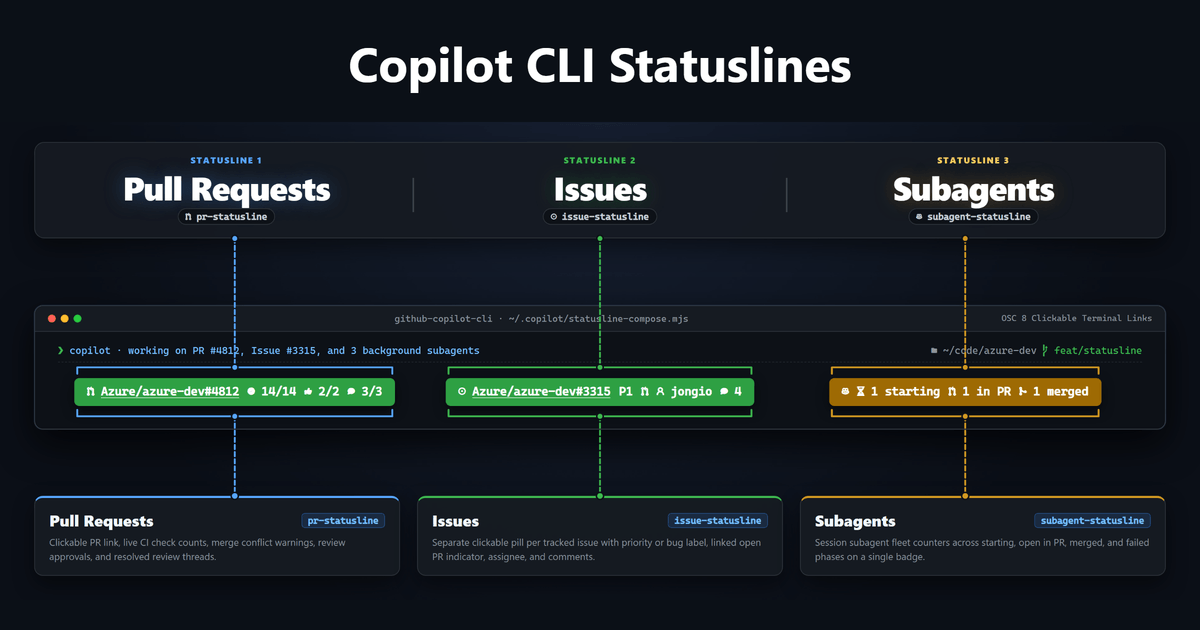
You can show just issues, just PRs, just subagents, or combine them side by side on one row. You don’t have to enable all three.
Pull Requests
pr-statusline shows the PRs your session is working on, with CI checks, approvals, unresolved review threads, and merge conflict warnings. Each PR has a clickable GitHub link.

Issues
issue-statusline gives each tracked issue its own clickable pill, with a priority or type label, linked-PR indicator, assignee, and comment count.

Subagents
subagent-statusline shows counts for agents that are starting, in PR, merged, or failed. Its link opens your repository’s pull requests page. For individual agent details, use /tasks in Copilot CLI.

The PR and issue links use terminal hyperlinks (OSC 8). In a supporting terminal, Ctrl+click or Cmd+click opens them in your browser.
Install
You’ll need Node.js and the GitHub CLI signed in with access to the repositories you’re working on.
Inside Copilot CLI, add my marketplace once:
/plugin marketplace add jongio/skillsThen choose one of these two options.
Just the Statuslines
If you only want the PR, issue, and subagent statuslines, install the dedicated plugin. It doesn’t install any skills:
/plugin install statuslines@jongio-skillsAll Skills and Statuslines
If you’d like my full skills collection along with the statuslines, install this instead:
/plugin install jongio-skills@jongio-skillsEither option offers a picker for the statuslines when the plugin first loads. You can change your selection anytime:
/statusline-setupWithout the Plugin Marketplace
You can also install only the statuslines with a standalone script.
Windows (PowerShell):
irm https://raw.githubusercontent.com/jongio/skills/main/install-statusline.ps1 | iexmacOS and Linux:
curl -fsSL https://raw.githubusercontent.com/jongio/skills/main/install-statusline.sh | bashBoth scripts let you choose which statuslines to enable. These commands download and run code, so review the PowerShell installer or Bash installer first.
The statuslines page has the full icon guide and source links. Pick the pieces you need. That’s what I wanted: enough context to check on a session without digging through it.
Share on LinkedIn
Quick Share: Your custom post text has been copied to your clipboard! Click the button below to open LinkedIn's share dialog, then paste it.
💡 Tip: LinkedIn will open in a new tab. Use Ctrl+V (or Cmd+V on Mac) to paste your text.
Note: LinkedIn will show the article preview. You can add your custom text above it.