

How to create an MVC Razor view for a generic List property
You have a model that has a property of type List. You write a view and your first inclination is to create a cshtml file called List.cshtml, but that doesn’t work. There’s a trick and it has to do with the way List<Tis expressed as a type in reflection form.
You can see this by calling GetType().Name on a List
List<string> strings = new List<string>();Console.WriteLine(strings.GetType().Name);
```javascript
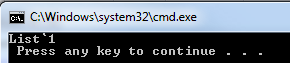
As you can see, the reflected name is List\`1, NOT List.
MVC (by default) will try to map the property to List\`1.cshmlt, not List.cshtml.
So you have two options.
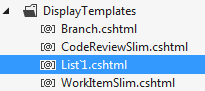
## 1. Name your DisplayTemplate List\`1.cshtml and let MVC automatically resolve the property template
@Html.DisplayFor(m => ss.Items);
## 2. Specify a Template Name when calling DisplayFor
```csharp
@Html.DisplayFor(m => ss.Items, "Items");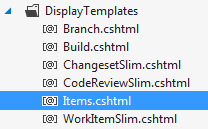
When you reference the @model in the view use either IList or List or if you know the type at design time then just use that i.e. List
My preference is to use option #2 because you’ll likely have many other classes that use List<Tand you’ll likely want to specify a different display template for each of them.
Jon
Please enable JavaScript to view the comments powered by Disqus.
Share on LinkedIn
Quick Share: Your custom post text has been copied to your clipboard! Click the button below to open LinkedIn's share dialog, then paste it.
💡 Tip: LinkedIn will open in a new tab. Use Ctrl+V (or Cmd+V on Mac) to paste your text.
Note: LinkedIn will show the article preview. You can add your custom text above it.