
How to Update a Linked Table Schema in Access
Scenario: You have a SQL Server database and you edit that data using Access. You make a schema change to the SQL Server table and you want that change to be reflected in Access. It’s easy, yet unintuitive, so I wrote this post to help you out.
1. Make the change to your SQL Server Database Table.
2. Open Access, got to External Data –> Linked Table Manager
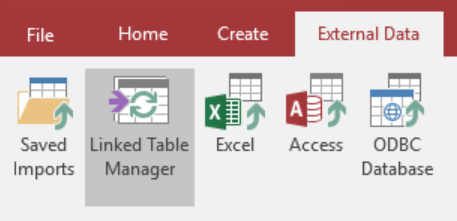
3. Select the table that you want to update and click OK
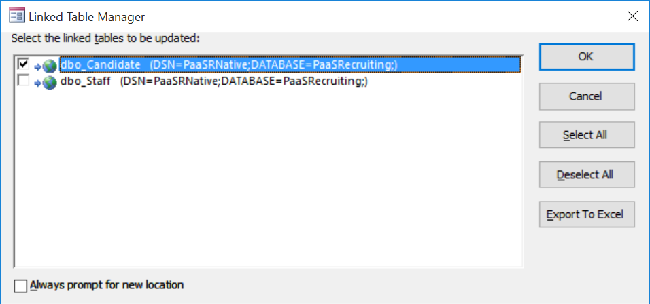
That’s all. Simple, yet I expected an “Update” button of some sort.
Jon
Share on LinkedIn
Quick Share: Your custom post text has been copied to your clipboard! Click the button below to open LinkedIn's share dialog, then paste it.
💡 Tip: LinkedIn will open in a new tab. Use Ctrl+V (or Cmd+V on Mac) to paste your text.
Note: LinkedIn will show the article preview. You can add your custom text above it.