

Brother Printer Troubleshooting Tips
I have a Brother MFC-7840W printer and usually have issues with it.
Here’s what has helped:
Drivers
1. Install the full driver package from here: https://support.brother.com/g/b/downloadtop.aspx?c=us&lang=en&prod=mfc7840w_all
2. Select your OS, click Search.

3. Install the Full Driver Package

Network Settings
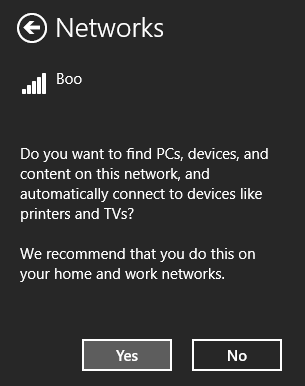
If you can’t find your printer then it is probably because you haven’t enabled sharing. The easiest way to do that is to disconnect and reconnect your wifi network.
1. Click on your wifi network icon next to your clock

2. Right click on your network and select “Forget this network”
3. Reconnect

4. When you get to this option, select Yes
Jon
Share on LinkedIn
Quick Share: Your custom post text has been copied to your clipboard! Click the button below to open LinkedIn's share dialog, then paste it.
💡 Tip: LinkedIn will open in a new tab. Use Ctrl+V (or Cmd+V on Mac) to paste your text.
Note: LinkedIn will show the article preview. You can add your custom text above it.