

How to Monitor Azure IoT Hub Traffic
1 min read
You have a couple different options to monitor your incoming and outgoing Azure IoT Hub traffic.
Azure CLI IoT Extension
See this ref for more info:
- https://aka.ms/iotcli
- https://docs.microsoft.com/en-us/cli/azure/ext/azure-cli-iot-ext/iot/hub?view=azure-cli-latest#ext-azure-cli-iot-ext-az-iot-hub-monitor-events
Desktop App
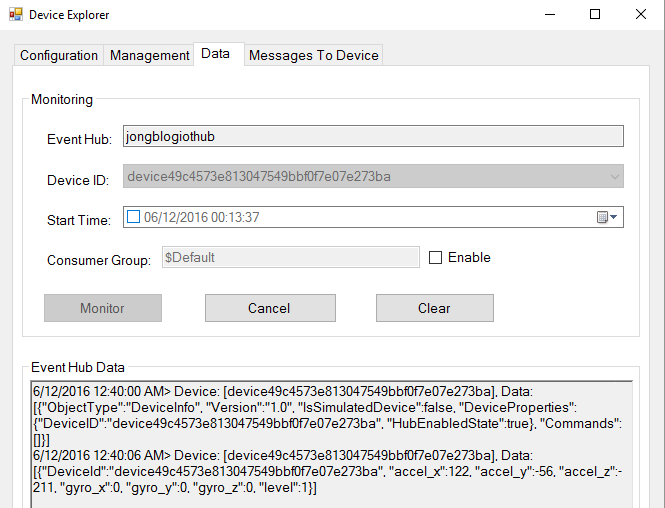
On Windows machines, you can use the Azure IoT Hub Device Explorer utility. Under the Data tab, select your device, click Monitor and you’ll start to see messages in the Event Hub Data
Node [Deprecated]
You can also use the iothub-explorer npm package.
npm install -g iothub-explorer@latest
```text
and then
```bash
iothub-explorer --login hubconnectionstring monitor-events deviceid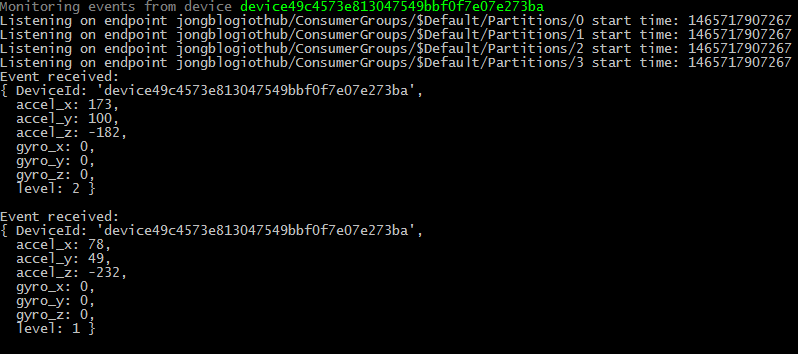
Jon
Share:
Share on LinkedIn
Quick Share: Your custom post text has been copied to your clipboard! Click the button below to open LinkedIn's share dialog, then paste it.
💡 Tip: LinkedIn will open in a new tab. Use Ctrl+V (or Cmd+V on Mac) to paste your text.
Note: LinkedIn will show the article preview. You can add your custom text above it.