

How to Change Your Raspberry Pi Password
1 min read
You’ll want to make sure you don’t leave the default ‘pi’ user’s password to the default ‘raspberry’ setting. Here’s how to change it.
Login to Pi
Login to your Pi via Remote Desktop, SSH or via monitor & keyboard with the default ‘pi’ user credentials.
Change Password
Open a Terminal and execute the following command:
passwdEnter your current password, then enter your new password twice.
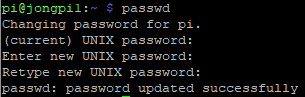
Your password is now changed.
Share:
Share on LinkedIn
Quick Share: Your custom post text has been copied to your clipboard! Click the button below to open LinkedIn's share dialog, then paste it.
💡 Tip: LinkedIn will open in a new tab. Use Ctrl+V (or Cmd+V on Mac) to paste your text.
Note: LinkedIn will show the article preview. You can add your custom text above it.