


azd Now Runs Provisioning and Deployment in Parallel
I’ve been wanting to write this one for a while. Since we shipped azd, provisioning and deployment have been sequential - one thing finishes before the next one starts. Same story for deployment: service A packages, publishes, and deploys before service B even starts. I kept watching azd up run on multi-service projects and thinking “these don’t depend on each other, why are they waiting?” For projects with a handful of services, you could feel it. For projects with ten or more, it was painful.
Starting with azd 1.25.0, that’s getting better. azd provision, azd deploy, and azd up now build a dependency graph and can run independent work concurrently.
For provisioning, it’s automatic - azd analyzes your Bicep layers and runs independent ones in parallel with no config change. For services, you opt in by adding uses to your azure.yaml. Without it, services still deploy sequentially for backward compatibility.
What changed
Before 1.25.0, the execution model was straightforward: do one thing, finish it, do the next thing. Here’s what that looked like for a project with two independent Bicep layers and three services:
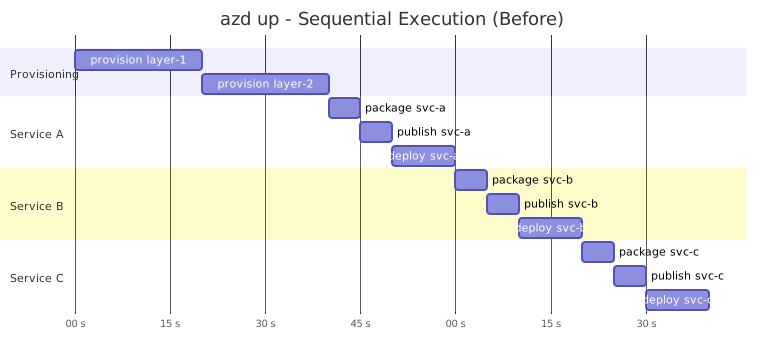
Wall-clock time was the sum of everything. Now it looks more like this:
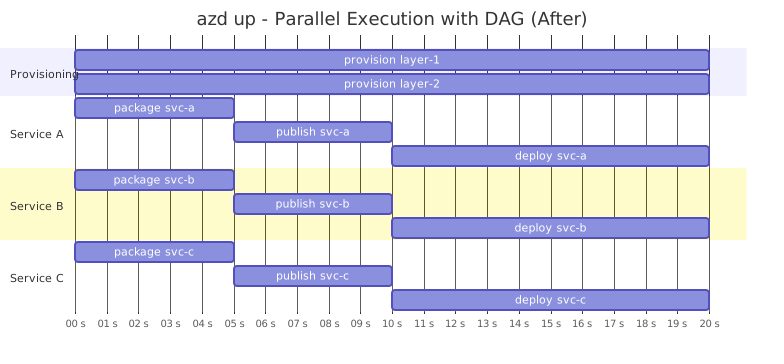
Independent work runs at the same time. Things that depend on each other still wait. In our benchmarks across 26 runs, multi-service projects saw 15-39% wall-clock improvements.
How it works
Under the hood, there’s a new package called exegraph - a general-purpose DAG (directed acyclic graph) execution engine. It has three pieces:
- Step - a unit of work with a name, dependencies, and a function to run
- Graph - a DAG that validates dependencies, detects cycles, and prioritizes steps by how much downstream work depends on them
- Scheduler - a goroutine-per-ready-node worker pool that runs steps as soon as their dependencies complete
Each azd command builds a graph for its specific use case:
azd provisionbuilds a graph of Bicep layers. If layer-2 doesn’t depend on any outputs from layer-1, they run in parallel. If it does, it waits.azd deploybuilds a graph of service operations - package, publish, deploy per service. Packaging and publishing always run in parallel across services. But deploy steps are sequential by default unless you addusesto your service definitions (more on this below).azd upbuilds a unified graph that combines everything: project hooks, provisioning, packaging, and deployment. Packaging can overlap with provisioning automatically because the graph knows what depends on what.
Layer dependency detection
For multi-layer provisioning, azd does static analysis of your Bicep files and parameter files to figure out which layers depend on which. It scans for environment variable references and substitution patterns, then traces them back to outputs from other layers.
If the analyzer hits a pattern it can’t resolve - like a dynamic variable name or an ARM template expression - it falls back to sequential execution for safety. You don’t get parallelism in that case, but you also don’t get broken deployments.
You can also declare dependencies explicitly in azure.yaml when the dependency isn’t visible in the Bicep files - for example, when a postprovision hook in one layer writes an environment variable that another layer reads:
infra: layers: - name: networking path: ./infra/networking - name: compute path: ./infra/compute dependsOn: - networkingService deployment and uses
Here’s an important detail: service deployment is sequential by default. If you have three services and none of them declares a uses field, azd deploys them one at a time in alphabetical order. This is intentional - lots of existing templates rely on implicit ordering, and we didn’t want to break them.
To opt in to parallel service deployment, add uses to your service definitions in azure.yaml. The uses field declares what a service depends on - other services, infrastructure resources, whatever it needs. When azd sees at least one uses declaration, it switches from sequential to graph-based deployment. Services without mutual dependencies deploy in parallel.
Here’s what that looks like:
services: api: host: containerapp language: js project: ./src/api worker: host: containerapp language: js project: ./src/worker uses: - api web: host: containerapp language: js project: ./src/webIn this example, worker depends on api, so it waits. But web and api have no dependency between them, so they deploy in parallel. Packaging and publishing always run in parallel regardless of uses - it’s only the deploy step that gates on these edges.
If you don’t add uses to any service, azd logs an advisory message suggesting you add it. It’ll even scan your service env configs for SERVICE_<OTHER>_* references and suggest specific uses declarations. It doesn’t change behavior though - just hints.
Error handling
The scheduler supports two policies: fail-fast (default) and continue-on-error. In fail-fast mode, when any step fails, the scheduler cancels all running steps and reports the failure. Steps that haven’t started yet get marked as skipped.
There’s also per-step timeout support. If a deployment hangs, it doesn’t take down the whole run. The step fails with a DeadlineExceeded error and you get a clear timeout message instead of waiting forever.
Concurrency controls
Provisioning parallelism works out of the box - no configuration needed. Service parallelism requires uses as described above. But if you need to tune concurrency limits, there are environment variables:
| Variable | What it controls | Default |
|---|---|---|
AZD_PROVISION_CONCURRENCY | Max concurrent Bicep layer deployments | Unlimited (capped at 64) |
AZD_DEPLOY_CONCURRENCY | Max concurrent service deployments | Unlimited (capped at 64) |
AZD_UP_CONCURRENCY | Max concurrent operations in unified up | Unlimited (capped at 64) |
AZD_DEPLOY_TIMEOUT | Per-service deploy timeout (seconds) | 1200 |
You can also set a deploy timeout via the --timeout flag on azd deploy or azd up. The flag takes precedence over the environment variable.
What stays the same
A few things to know if you’re wondering whether this will break your project:
- Single-layer, single-service projects run through the exact same code path. They build a one-node graph and execute it. Same behavior, trivial overhead.
- Custom
workflows.up:in azure.yaml still runs on the existing workflow runner, unchanged. The phase-scoped DAGs (parallel provisioning, parallel deploy) still apply inside each sub-command, though. - Project hooks fire exactly once. The
preup/postuphooks fire from middleware. All other hooks (preprovision,postprovision,predeploy,postdeploy) are wired as nodes in the graph with explicit dependencies, so they can’t double-fire.
Try it
If you don’t have azd yet, install it from aka.ms/azd. If you already have it, update to 1.25.0:
azd updateThat’s it. Your next azd provision will be faster if you’ve got independent layers. For service deployment, add uses to your azure.yaml and you’re in. If you’ve got a multi-layer or multi-service project, it’s worth the two minutes to set up.
Share on LinkedIn
Quick Share: Your custom post text has been copied to your clipboard! Click the button below to open LinkedIn's share dialog, then paste it.
💡 Tip: LinkedIn will open in a new tab. Use Ctrl+V (or Cmd+V on Mac) to paste your text.
Note: LinkedIn will show the article preview. You can add your custom text above it.