

Solution to unresponsive Visual Studio Extension Manager Update button when trying to update NuGet Package Manager
For some reason the “Update” button in my Visual Studio Extension Manager isn’t responding to clicks. I clicked it about 10 times to no avail.

I messed around with Extension Manager settings a bit, but gave up and decided to just download from the website.
To ensure you are getting the right version click on the “More Information” link in the left hand column of the Extension manager form.
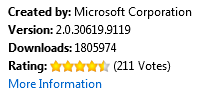
Right now it takes you to this url: http://visualstudiogallery.msdn.microsoft.com/27077b70-9dad-4c64-adcf-c7cf6bc9970c?SRC=VSIDE, but that may change in the future.
Click download. Restart VS and you are good to go.
Scott Hanselman has a good post on why you should update to NuGet 2.0
Jon
Share on LinkedIn
Quick Share: Your custom post text has been copied to your clipboard! Click the button below to open LinkedIn's share dialog, then paste it.
💡 Tip: LinkedIn will open in a new tab. Use Ctrl+V (or Cmd+V on Mac) to paste your text.
Note: LinkedIn will show the article preview. You can add your custom text above it.