
How to Connect a PN532 NFC Shield to a RaspberryPi via libnfc
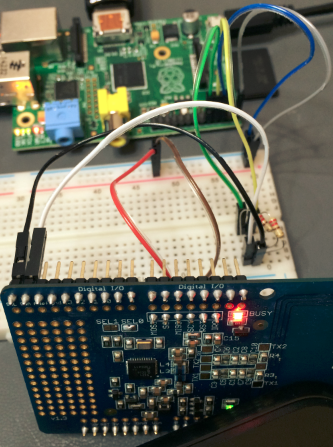 I’m working on an NFC project and to test things out I got a PN532 NFC shield working with a RaspberryPi via libnfc.
Adafruit has a good step-by-step tutorial, but it’s not up-to-date and it’s for the PN532 breakout board not the PN532 shield. They also have this one for Arduino – it’s not RaspberryPi, but still helpful for understanding the concepts.
Here’s how I got it going – hope this saves you some time.
- 1. Get Occidentalis v0.2*
https://learn.adafruit.com/adafruit-raspberry-pi-educational-linux-distro/occidentalis-v0-dot-2
- 2. Make Occidentalis SD card*
- 3. Run first time config*
https://learn.adafruit.com/adafruits-raspberry-pi-lesson-2-first-time-configuration
- 4. Free UART on the Pi*
https://learn.adafruit.com/adafruit-nfc-rfid-on-raspberry-pi/freeing-uart-on-the-pi
-
On step one remove any key-value pairs that reference ttyAMAO (i.e. console=ttyAMAO,115200) and keep everything else. http://www.raspberry-projects.com/pi/pi-operating-systems/raspbian/io-pins-raspbian/uart-pins
-
5. Get and Build libnfc*
https://learn.adafruit.com/adafruit-nfc-rfid-on-raspberry-pi/building-libnfc
-
On step three you might get the following: “./configure command not found” if so then follow the instructions here: http://forums.adafruit.com/viewtopic.php?f=19&t=53935#p292489
-
6. Prepare the PN532*
When I was going through this I was going under the assumption that libnfc only worked in UART mode (because that is what I found on from many sources), but I later found that it does support I2C and SPI. To get PN532 in UART mode you need to solder SEL0 on the board (make sure you are soldering SEL closest to MOSI on the board. In v.1 of PN532 SEL0 and SEL1 labels were reversed.

I found that info here: https://www.mobilefish.com/developer/libnfc/libnfc_quickguide_adafruit.html
-
7. Wire up the PN532 to the breadboard and the RaspberryPi*
-
Connect 5v power and GND from RaspberryPi to breadboard
-
Connect 5v power and GND from PN532 to breadboard
The PN532 outputs 5V, but the RaspberryPi TXD and RXD pins are rated for 3.3V so we need to put a 220ohm resistor between them.
- Connect PN532 SCL to RaspberryPi TXD with a 220ohm resistor between them
- Connect PN532 SDA to RaspberryPi RXD with a 220ohm resistor between them

- 8. Test it out*
https://learn.adafruit.com/adafruit-nfc-rfid-on-raspberry-pi/testing-it-out
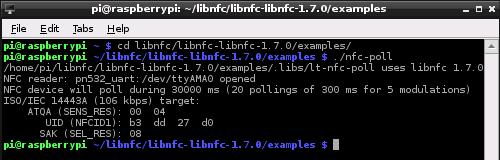
After running nfc-poll and swiping a card you should see your UID – which means it is working!
Let me know if you run into any issues.
Jon
Share on LinkedIn
Quick Share: Your custom post text has been copied to your clipboard! Click the button below to open LinkedIn's share dialog, then paste it.
💡 Tip: LinkedIn will open in a new tab. Use Ctrl+V (or Cmd+V on Mac) to paste your text.
Note: LinkedIn will show the article preview. You can add your custom text above it.